
The State of AI for Programmer


This series will cover Build .NET Apps with AI and GitHub Copilot in depth over several parts.
What to expect:
- Part 1: The State of AI for Programmer (this post)
- Part 2: Set up a .NET development environment with AI (coming soon)
I started learning about AI because of one simple phrase: “AI will soon replace developers.” After working as a full-stack developer for 15 years, I couldn’t help but wonder: if AI really replaces me, what will I do next?
I’ve been using AI in my app development ever since GitHub Copilot was released as a public preview. Since then, it has been a amazing experience that changed the way I write code. While AI can't write the code entirely on its own yet, it has been incredibly helpful to me in suggesting me the snippets that speed up my app development.
Every since the release of AI, I have been observing the trend of the AI. From watching some influencers "vibe code" entire program using AI, to now reading some posts and research stating that AI still incapable replacing developers.
This is why I think "mirage" is the best way to describe the current situation. Let’s talk about it.
Mirage #1: Productivity is increasing
From management point of view
From a management point of view, countless articles and discussions highlighting the benefits of AI. But AI adoption comes with a cost. As of 4 January 2026, it costs around 10 USD per developer for GitHub Copilot Pro license. For many companies, this might not seem like a huge expense. But how can we find out AI is a good investment?
Feedback loop is the only way to find out the investment of AI worth it or not. To measure the effectiveness of using AI, line of code is not something that should take into consideration these days. With the help of the AI, developer can generate thousand lines of code, hence, LOC can't be counted as productivity increase.
Quality of code over the quantity. Smaller, well define code base is usually desirable than a large, cumbersome one. More lines can lead to increased cognitive complexity.
To measure that, we can use DORA matrix to measure the delivery pipeline efficiency from throughput and stability as discribe in Accelarate. Throughput metrics measures how quickly and frquently changes reach production, that includes deployment frequency, lead time for changes and failed deployment recovery time. While the stability metric evaluates deployment reliability such as change failure rate, deployment rework rate.
SPACE is another framework that checks out the full developer experience by looking at five key areas: Satisfaction and well-being (like how happy devs are and if they’re burning out), Performance (actual outcomes like reliable code and quick fixes), Activity (stuff like commits and PRs to see work patterns), Communication & collaboration (team chats, meetings, and cross-team vibes), and Efficiency & flow (smooth workflows without constant interruptions). It mixes surveys for the feels with tool data for the facts, helping teams spot why productivity dips and fix it holistically instead of just chasing more code.
From developer point of view
From a developer’s standpoint, AI is often marketed as a powerful coding companion. We keep hearing all these sweet promises: faster delivery, fewer bugs or effortless productivity. There are so many features being introduced by the AI agent, I have noticed only part of the features are being utilized by developers. here's my observations on how developers using AI:
-
Observation 1
Some developers still use ChatGPT and copy the code manually. The main reason? GitHub Copilot has token limits, and they’d rather save those tokens for actual feature development. ChatGPT, on the other hand, gives them access to the latest models for free, so it’s an easy choice.
-
Observation 2
There are also developers who haven’t updated their GitHub Copilot extensions. They’re still on older versions where you don’t even see a proper model picker, so they miss out on newer features like model selection and auto model selection.
-
Observation 3
Quite a few developers don’t realize they can choose different models, or that models even behave differently. For them, AI is just one big black box that “writes code.” The nice part is that GitHub now has an Auto option that picks a model for you and even applies a small discount on premium requests (around 10%), which helps with token usage without forcing you to think about models at all.
GitHub Copilot and similar tools ship a ton of features—chat, inline edits, agents, model switching, MCP servers, and more. But a lot of that power goes unused simply because people don’t know it exists or don’t have time to explore it. In just about a year, we’ve seen things like MCP servers and richer ways to plug context into AI, and it’s honestly hard to keep up.
On top of learning languages, frameworks, libraries, and cloud platforms, developers now have to learn how to work with AI: prompt well, pick models, manage tokens, and wire in tools. Surveys and industry posts are already pointing out that while AI speeds things up, it can also add stress and cognitive overload, because there’s simply more to juggle, more options, and more constant change. It’s exciting, but it’s also totally normal to feel overwhelmed by how fast all of this is moving.
Without learning the proper way to utilize AI, some developers just throw certain sentences to the AI agent, and expect the AI will generate the code for them. Most of the time, the prompt need to be redefine again and again. In the old day, developer spends time to learn and search for the working code snippet. Now developer spends time in chatting with AI again and again. I'm just wondering, how many developers spend time learn to write a good prompt?
Different developers use different ways to talk to AI and pick different AI models, so the code they get looks very different from each other. During code reviews and pull requests, this causes arguments about what's right, leading to lots of rewriting and fixing the code. Even though AI helps write code faster at first, these problems make the whole process take much longer.
With the help of AI, code can be generated more easily. It also creates more work for architects or developers to review the code. A good PR should be simple and straightforward. But with help from AI, double-digit file changes can be easily done. Do developers review the code before creating a PR? Or do they just leave the code review to the reviewers?
So with all this... is productivity actually up? Now it's your turn to find out.
Mirage #2: AI can help writing code
The hype around AI’s ability to write code is sky-high. Many tech influencers have showcased how much time it saves them, with examples like:
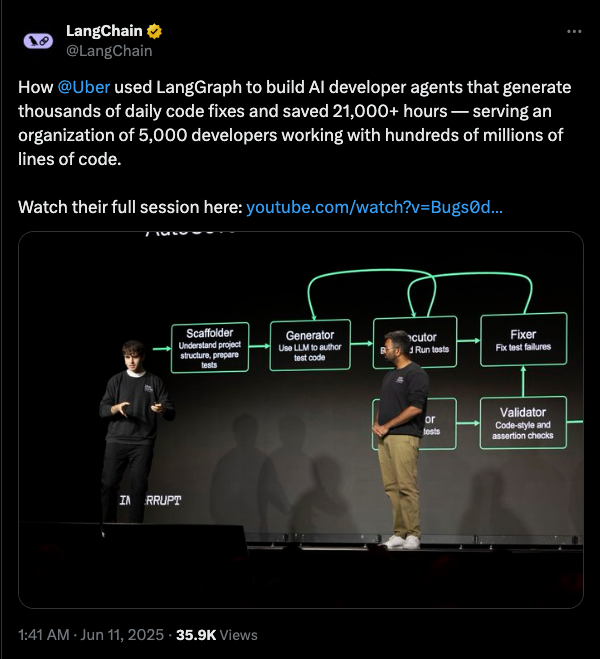
When AI first took off, my social media feed was full of stories saying it would replace developers and take over building apps. Those posts made it sound like AI would replace developers and take over app development. But not recently.
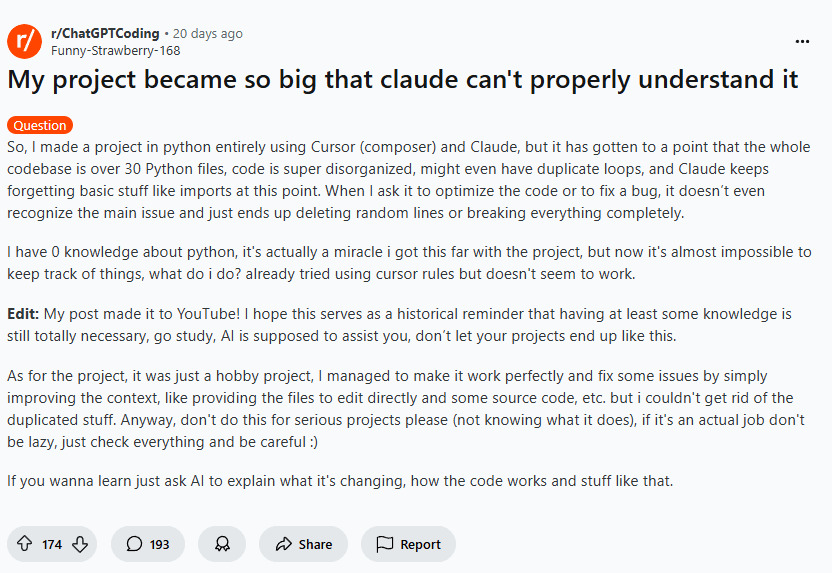
Source: My project became so big that claude can't properly understand it
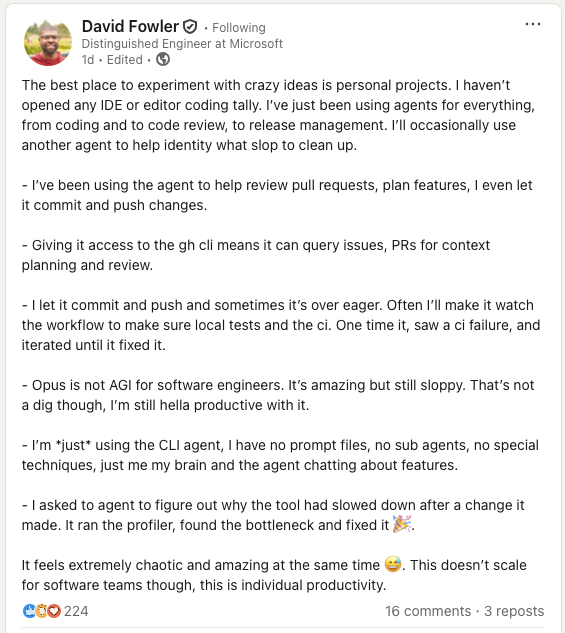
Source: David Fowler's experience with AI
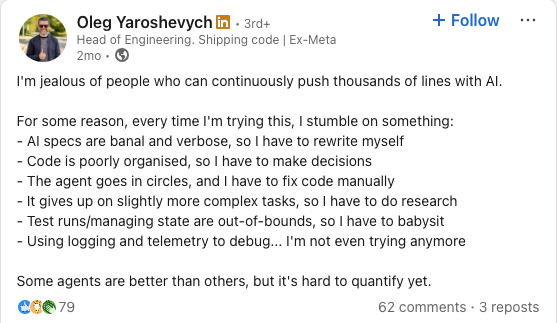
Source: Struggling with AI: Why I envy those who push thousands
AI-driven development looks very promising, but we're not fully there yet (as of Jan 4, 2026). To build apps with AI, developers must be proficient at writing prompts, yet surveys show many struggle, with proficiency varying widely and frustrations like "almost right" outputs common. Garbage in, garbage out. Let me explain why it's still hard for AI to fully drive app development.
Let's start with a basic example of a simple prompt:
Prompt: The sky is
Output: blue.
Let's try to improve it a bit, you will get a better result.
Prompt: Complete the sentence: The sky is
Output: blue during the day and dark at night.
These two simple prompts give different results. Both are correct, but which is better? It's hard to say. Just imagine an inexperienced developer using AI to generate working code. Does clean code still matter to them? All the best practices that we learn since years back, are they still making sense these days with AI? For sure the code is working. This ties back to an earlier point: use AI to generate code, then have teammates review it.
Yes, AI definitely helps with writing code. But the results vary. AI doesn't read your mind. Hence, a good prompt definitely helps AI to understand your intent. Duck-vader - @Michael Mortenson shared an insight with me. Here we can play out the AI over time.
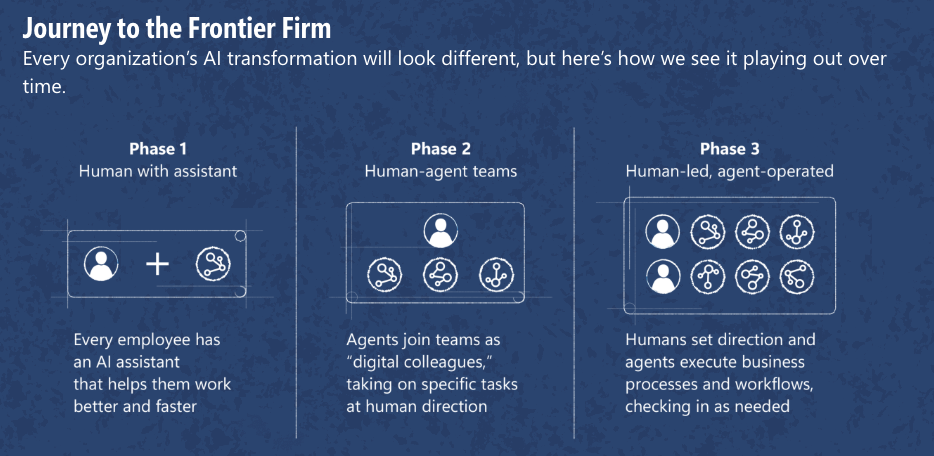
The article above shows we are in phase 2 right now, with tools like digital colleagues in our arsenal — GitHub Copilot, Claude, and more, to help delivering code. But, how to ensure the code generated are the code that we would like to have? I've tried spec-driven development, and to build an app, you need to clearly define requirements, guidelines, architecture, dos and don'ts, and more. Instead of writing code, you write lots of instructions, which leads to:
-
High learning curved.
Instead of writing code ourselves, developers now write specs and let AI do the work. We need to learn how AI behaves, align with the team on coding standards, keep retrying until we get the right code, review it and have teammates review it too. On top of that, you still need to have experience writing code that complies to the best practice. Now repos have also evolved from just code (with little documentation) to specs + code.
-
Context switching
Code agent is capable to handle few features at once. Let's take an example when a developer might use agents for two features simultaneously. Just to be honest with you, I'm really bad at context switching. But these tools encourage developers to work with multiple agents, running several contexts in parallel. In the old days, developers just focused on code. Now they need to learn good prompts + good code. I wonder how fresh grads start their careers with so much to learn these days.
-
AI makes me lazier as a developer
AI makes me lazier sometimes. I used AI to write a Bash script I didn't know how to write. It worked, even if it didn't follow best practices. Since Bash isn't my focus, I only cared that it ran, just like the meme below.
In the old days, we have no shortcuts to take. we had to read books and learn properly. AI helps writing code fast, but are we getting lazy and don't learn how to code ourselves anymore?
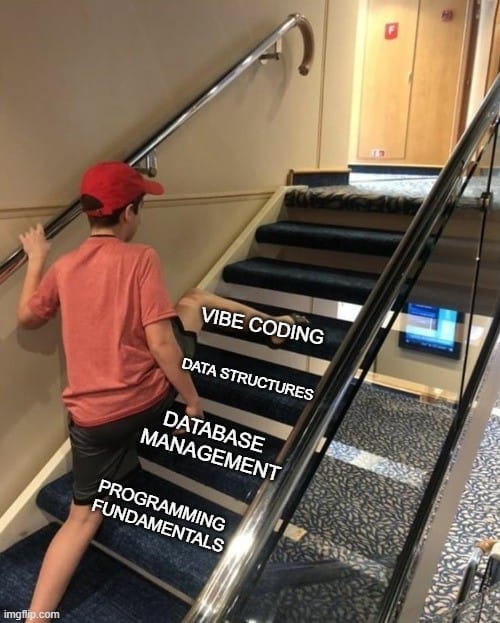
Even though we're in phase 2 with tools ready for AI code generation, we're not fully there yet. I strongly believe we're still in phase 1, where AI acts as an assistant to deliver work better and faster.
Different AI models, different outputs
Free model such as GPT-4o generates outdated code even though it's fast. More developers use premium model like Claude Opus, but it requires tokens. Developers often switch between models for different tasks. Outputs aren't identical unless you tell AI exactly how to write code line by line, which defeats the purpose.
With AI advancements, you can now set custom instructions so you don't repeat yourself. This tries to solve key problems:
- No need to reset context every time.
- Better, more consistent output.
- Prevent hallucination or guessing with precise instruction.
Good stuff doesn't come easy. Instructions have character limits — 1,500 characters per field. You could use multiple instruction files, which works. But the more instructions you give AI, the slower it becomes. You also need to ensure instructions are direct, clear, and don't conflict with each other. Imagine having 10 instruction files, you'd have to cross-check that they all align.
AI needs time to process instruction files, study your workspace, and read attached files. Even though AI is fast, understanding so much information takes time.
When reasoning modes were announced, they were great inventions that let AI "think" before answering. We can even use different AI models together to get better results. But more context means more processing time for AI to generate answers.
The complexity grows further with MCP server integration. AI must communicate with MCP servers to retrieve relevant data, while VS Code includes default tools like file editing, search, and web search. All adding to processing overhead.
If you're using this setup to develop features and AI doesn't give you satisfying results, you'll need to regenerate the code, which costs more tokens. This is why premium tokens run out quickly without a good AI agent setup.
Copilot give premium model with limited usage. If you are asking question and generate code without much context, it should be enough for you to use for a month. If we keep adding more instructions or MCP server, more information the AI has to process, you will find out the premium token will soon be depleted. going for pro license is way too expensive. A company won't give such expensive license unless you can proof the value of it to the management, while management is still suffering from getting feedback from the invesment.
Mirage #3: The code seems working
AI suggests code based on what it learned during training. It often recommends code that doesn't work. AI uses whatever information it has to create answers that seem reasonable. Sometimes it works, but not always, especially when information is scarce, technology is brand new, or new versions launch without documentation yet. This happens frequently in open source projects. That's when hallucinations occur.
I use a clever prompting trick—adding "make no mistake" or "do not guess" at the end. It works, but most of the time AI returns no results or uses outdated info. For example, GPT-4o suggests .NET 6 code when .NET 10 is already out. With newer features like MCP servers or web search built in, results improve slightly, but you still need very specific instructions, especially with single-shot prompts.
With multi-shot prompting, you keep asking questions until you get satisfying results. Often your prompts are commands rather than instructions. AI naturally follows your commands and says things like "You are absolutely right!". When AI does this, it tends to agree with whatever you said—this is called sycophancy, and it's where hallucinations often happen. Or you give contradictory instructions, first asking for result A, then forcing a specific result that conflicts with A. AI doesn't know what to do, so it might give you made-up answer.
I once spent a lot of effort prompting AI to generate shell script code for me. I'm no expert and don't know how to write shell scripts. AI gave me a complete script, but when I ran it, I hit errors. The error messages weren't clear. Sometimes there were no error messages at all. This scenario is very common with shell scripts. It took me forever to figure out what went wrong until I learned about exit codes. Troubleshooting is hard when you didn't write the code yourself and aren't an expert in that language.
Another trick I often use is asking the AI agent to run the generated code as well. For applications, it runs the tests and for scripts, it executes the script to ensure no errors. Code quality can be addressed later through refactoring. The first step is getting it working. This is why spec-driven development includes tests in the workflow, ensuring the generated code actually functions.
Will AI replace developer?
It depends.
Tailwind laid off 75% of their stuffs because of the impact of AI that has on their business. CEO Adam Wathan said AI like ChatGPT and Claude now writes Tailwind code right away. People don't visit Tailwind's site anymore to learn. That's where they sell paid add-ons like design kits.
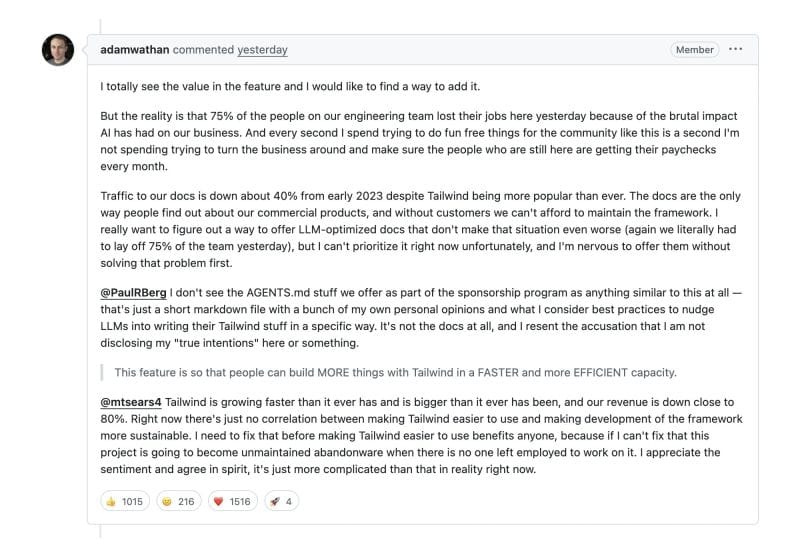
Even though AI has changed software development a lot, fundamental programming skills are still essential. AI doesn’t show you how to design scalable applications, it can’t deploy them for you, and it doesn’t understand your company’s unique setup. You’re still the driver, AI is just your co-pilot.
This is why we here are advocating: AI first software engineering, till AI is fully matured.
For juniors, learn alongside AI. Don't take everything from AI as-is. You're inexperienced, but with AI's help, you'll learn a lot from it.
For seniors, treat AI as your pair programming partner where you're the driver. It helps write repetitive or straightforward code. You just need to learn effective prompting. You can also use AI to review your code. Having AI review first reduces comments in PRs and catches silly mistakes early, rather than waiting for peer review. I've personally learned a lot this way.
AI will enable developers to write code faster, which may reduce demand for some developer roles in the future. At the same time, new positions will emerge because of AI—like AI engineer, agent developer, and AI integration engineer. Software release cycles are getting faster. Learn alongside AI.
This is the first post of the Build .NET with AI series. I'll focus on AI-assisted development for now until I've mastered developing apps with agents/"AI Colleagues". More will come.
The next article will cover the fundamentals of setting up a development environment with AI for .NET.
This article uses AI to proofread and review the content, but the content itself comes from me, backed by proof and not hallucination. After AI was introduced, most people can write good English. But I've started appreciating human-written messages more, they're genuine, have their own tone and opinion, and aren't polluted by AI. That's why I write my own articles myself rather than depending on AI.